Armored Turtle Automated Filament Control (AFC) Buffer
This file describes the AFC_buffer module, part of the Armored Turtle Automated Filament Control (AFC) project.
Overview
The AFC_buffer module is responsible for handling the buffer, currently supported buffers are
TurtleNeck and TurtleNeck 2.0/Pro.
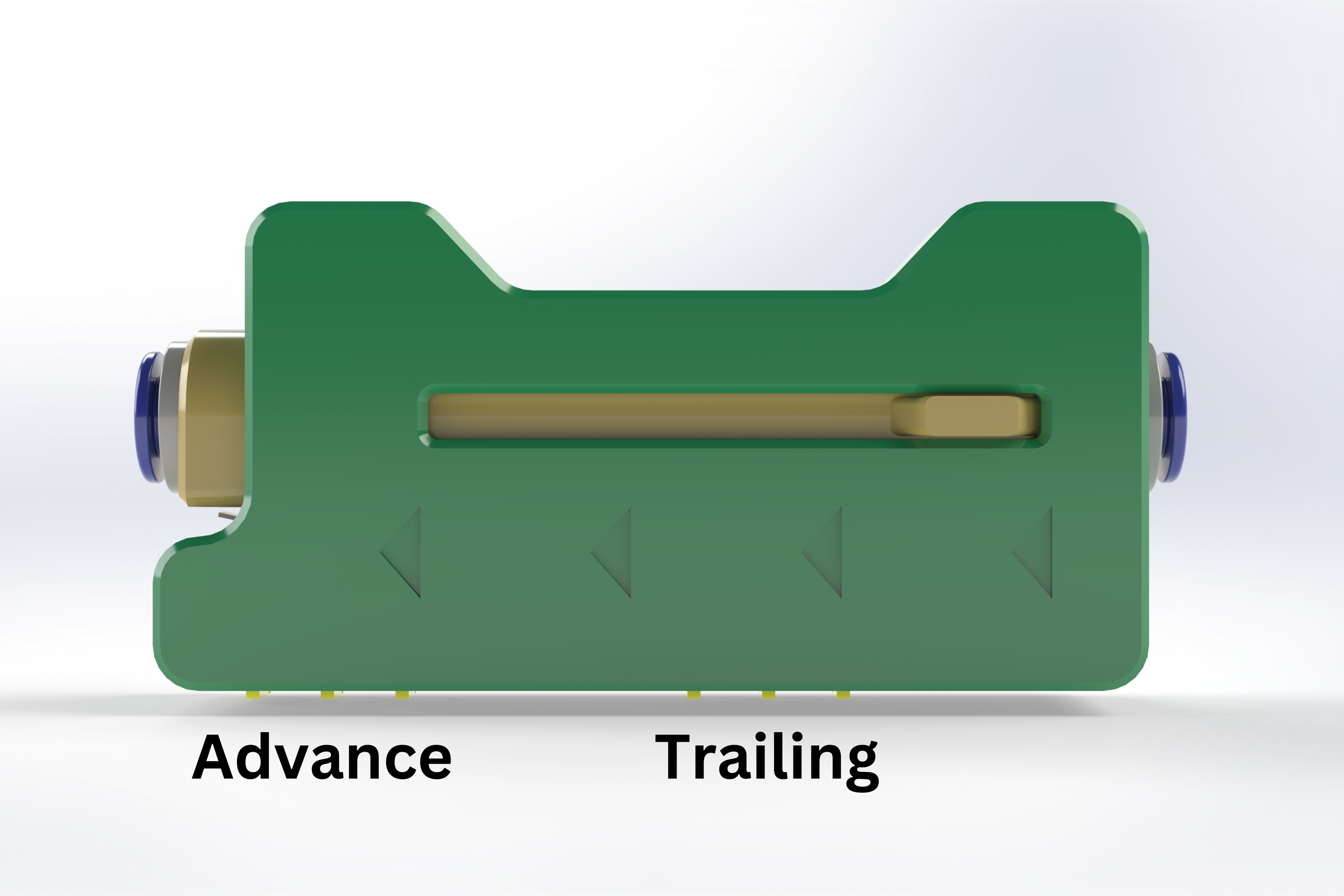
The Turtleneck buffer involves two sensors (advance and trailing).
The buffer adjusts rotation distance for active Box Turtle extruder(lane) based on sensor inputs and can either compress or expand to manage filament feeding properly.
Basic Functionality
The AFC buffer is designed to work with two extruder filament control systems. The primary extruder is at the print head(s) and the second is in the AFC unit. While the 2 extruders are synced they will never be perfect. This is where a buffer comes in. The buffer is used to make up for any inconsistencies in the sync between the 2 stepper motors.
TurtleNeck Style buffer
Two sensor TurtleNeck-style buffers are used to modulate the rotation distance of the secondary extruder. The buffer's expansion or compression increases or decreases the rotation distance.
-
If the
trailingsensor is triggered, this means that the buffer is compressed, the AFC will decrease rotation distance in order to move the filament quicker to the primary extruder. When thistrailingsensor is triggered, the system goes into anadvancingstate and the buffer starts to expand. -
If the
advancesensor is triggered, this means that the buffer is expanded, the AFC will increase rotation distance in order to slow the filament moving to the primary extruder. When thisadvancedsensor is triggered, the system goes into atrailingstate and the buffer starts to compress.
Turtleneck 1.0
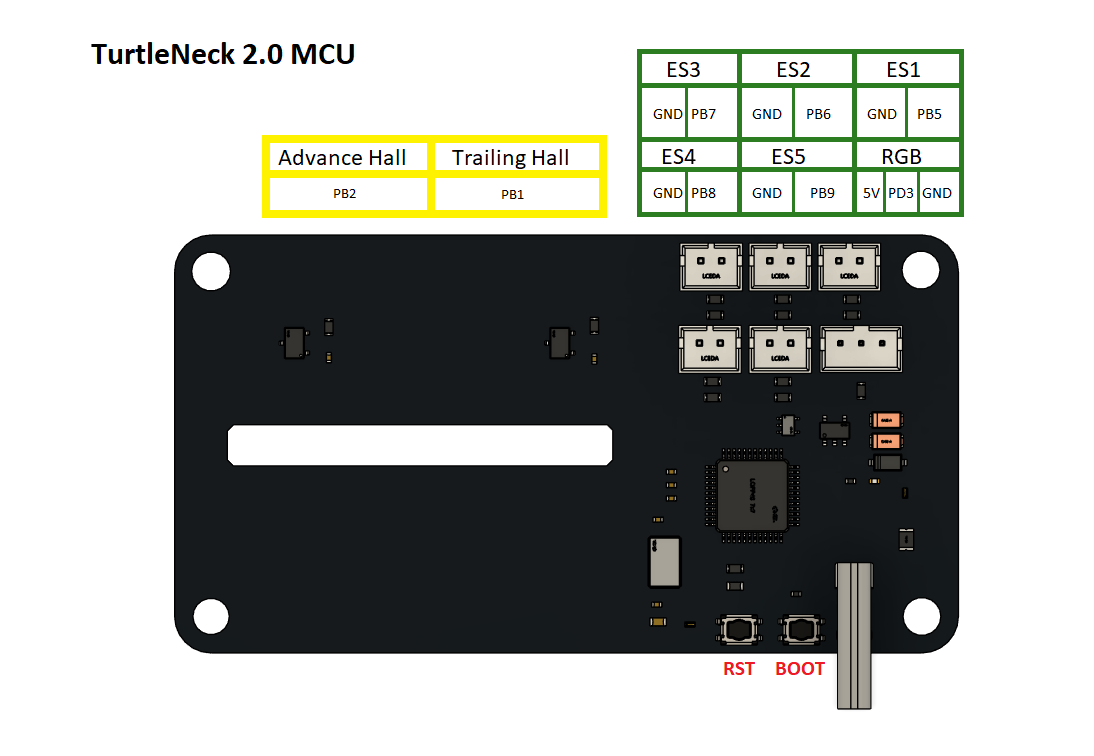
TurtleNeck 2.0
Configuration
Required AFC Hardware Configuration Options
In your AFC hardware configuration file, ensure you include the following options:
TurtleNeck Style buffer
advance_pin: Pin for the advance sensor.trailing_pin: Pin for the trailing sensor.
Optional for more fine-tuning:
multiplier_high: Factor to move more filament through the secondary extruder.multiplier_low: Factor to move less filament through the secondary extruder.
TurtleNeck 2.0 LED Indicator Configuration
Add to AFC_hardware.cfg file:
[AFC_led Buffer_Indicator]
pin: TN:PD3
chain_count: 1
color_order: GRBW
initial_RED: 0.0
initial_GREEN: 0.0
initial_BLUE: 0.0
initial_WHITE: 0.0
Optional AFC.cfg LED settings
Example Configs
[AFC_buffer Turtle_1]
advance_pin:     # set advance pin
trailing_pin:    # set trailing pin
multiplier_high: 1.05   # default 1.05, factor to feed more filament
multiplier_low:  0.95   # default 0.95, factor to feed less filament

[AFC_buffer TN2]
advance_pin: !turtleneck:ADVANCE
trailing_pin: !turtleneck:TRAILING
multiplier_high: 1.05   # default 1.05, factor to feed more filament
multiplier_low:  0.95   # default 0.95, factor to feed less filament
led_index: Buffer_Indicator:1
Buffer Fault Detection
Experimental
This feature is still experimental and you still may run into false detections during initial purging/first layer when starting a print.
AFC can detect filament faults during printing by monitoring extruder position and buffer state changes. This feature helps identify clogs, jams, and feeding issues before they result in failed prints.
The fault detection system monitors how far the extruder has moved relative to buffer switch activations. If the extruder travels beyond a configured threshold distance and the buffer fails to respond appropriately, AFC will pause the print and provide diagnostic information about the issue.
Fault detection uses a configurable sensitivity scale from 0-10, where:
0disables fault detection completely1is the least sensitive (allows 100mm of movement before triggering)10is the most sensitive (triggers after only 10mm of movement) The formula used is:fault_distance = (11 - sensitivity) × 10
When a fault is detected, AFC provides contextual error messages based on the buffer state:
- If the buffer is in the Advancing state (expanding), the message indicates a potential CLOG DETECTED
- If the buffer is in the Trailing state (compressing), the message indicates AFC NOT FEEDING
To enable fault detection, add the filament_error_sensitivity parameter to your [AFC_buffer <buffer_name>] section:
[AFC_buffer TN]
advance_pin: <pin>
trailing_pin: <pin>
filament_error_sensitivity: 5.0  # 0-10 scale, 0 disables
multiplier_high: 1.1
multiplier_low: 0.9
AFC_SET_ERROR_SENSITIVITY command:
AFC_SET_ERROR_SENSITIVITY BUFFER=TN SENSITIVITY=7.0
Off-Nominal Buffer Configurations
Buffers can also be set per Unit/Stepper. If multiple lanes use the same buffer for one Unit then the buffer can just
be added to Unit config (AFC_BoxTurtle, AFC_NightOwl, etc.). If a buffer is inputted into the AFC_stepper
config then this will override whatever is set at the Unit level.
Example
Setting buffer for a single unit
Overriding buffer at stepper:AFC buffer commands
QUERY BUFFER
The QUERY_BUFFER command reports the current state of the buffer and, if applicable, the rotation distance
of the AFC stepper motor.
Example usage:
QUERY_BUFFER BUFFER=Turtle_1
Example outputs:
Turtle_1: Trailing (buffer is compressing)- buffer is moving from the Advance trigger to the Trailing.Turtle_1: Advancing (buffer is expanding)- buffer is moving from the Trailing trigger to the Advance.
SET_ROTATION_FACTOR
For TurtleNeck Style Buffers
This command allows the adjustment of rotation distance of the current AFC stepper motor by applying a factor. Factors greater than 1 will increase the rate filament is fed to the primary extruder, factors less than 1 but greater than 0 will decrease the rate filament to the primary extruder.
Example Usage:
SET_ROTATION_FACTOR BUFFER=Turtle_1 FACTOR=1.1
SET_BUFFER_MULTIPLIER
For TurtleNeck Style Buffers
SET_BUFFER_MULTIPLIER used to live adjust the high and low multipliers for the buffer
- To change multiplier_high: SET_BUFFER_MULTIPLIER BUFFER=Turtle_1 MULTIPLIER=HIGH FACTOR=1.2
- To change multiplier_low: SET_BUFFER_MULTIPLIER BUFFER=Turtle_1 MULTIPLIER=LOW FACTOR=0.8
Note
Buffer config section must be updated for values to be saved